admin


The H264 Streaming Module is a webserver plugin that enables HTTP pseudo-streaming – the technology that allows you to jump to any part of a video regardless of whether it has been downloaded yet.

This post is mostly an aide-memoire for us, but putting it ‘out there’ in case it’s useful to others too.

HTTP pseudo-streaming – what is it?

HTTP Pseudostreaming lets you play back MP4 and FLV videos in portions – this means your video viewers can seek to parts of a video which have not yet been downloaded (as you can do on YouTube).

It’s useful for browsers which require flash mode (as HTML5 browsers can pseudo-stream automatically), and because it uses HTTP, your videos will work regardless of firewall settings.

For full information, please see the excellent article on the JW PLayer site.

Installing the H264 Streaming Module on a Cpanel server

1) Login as root to the server via ssh.

2) Switch to your home directory, download and unpack the Module.

cd ~
wget http://h264.code-shop.com/download/apache_mod_h264_streaming-2.2.7.tar.gz
tar -zxvf apache_mod_h264_streaming-2.2.7.tar.gz
cd ~/mod_h264_streaming-2.2.7

NB: This example is for version 2.2.7. Check on the CodeShop website to ensure it is still the latest version ;-)

2) Configure and install the module.

./configure
make
sudo make install

The installer will hopefully install in the /usr/local/apache/modules directory, but double check by looking at the information in the last 20 or so lines of the output!

----------------------------------------------------------------------
Libraries have been installed in:
/usr/local/apache/modules

3) Now include the module in the Apache configuration.

There are two ways to do this – via command line, or via WHM. We’re already in shell, so lets look at that way first.

a) Via Shell, using the vi text editor

vi /usr/local/apache/conf/includes/pre_main_global.conf

One in vi, hit the ‘i‘ key to enter insert mode and paste the following:

LoadModule h264_streaming_module /usr/local/apache/modules/mod_h264_streaming.so
AddHandler h264-streaming.extensions .mp4

NB: If the module was installed in a different directory to /usr/local/apache/modules/ then adjust accordingly!

Now save the file – hit ESC key to exit insert mode, then type the following to save and quit.

:wq

Finally, rebuild the config file and restart apache

/usr/local/cpanel/bin/build_apache_conf
service httpd restart

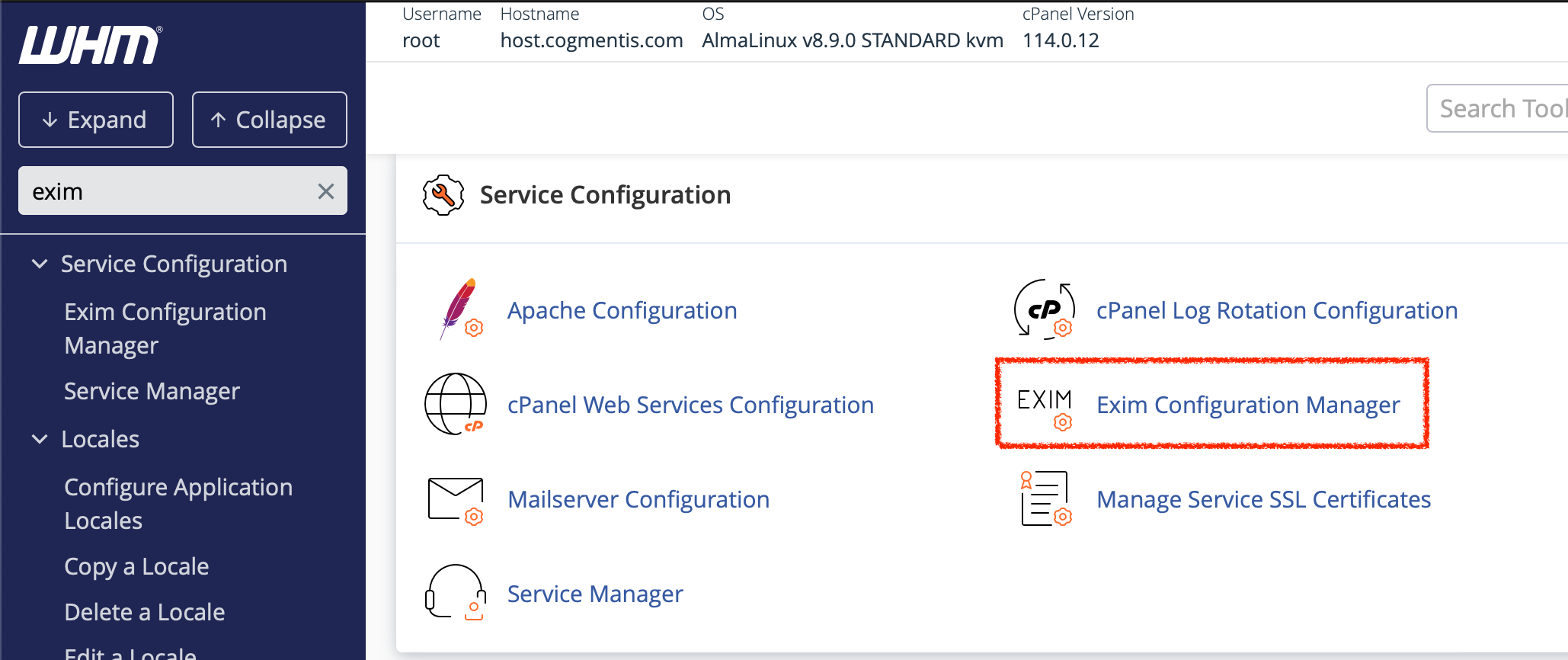
b) Via WHM

Select “Apache Configuration”

Select “Include Editor”

Under “Pre-Main Include” select “All Versions”.

Enter the following:

LoadModule h264_streaming_module /usr/local/apache/modules/mod_h264_streaming.so
AddHandler h264-streaming.extensions .mp4

NB: Again, checking the path to module is ok.

Select ‘Update’ and follow instruction to restart apache.

4) Finally, if you are using it commercially, you need to get a licence
(€39 for single webserver at time of writing)


Gil Boyne Online is part of Gil’s legacy of valuable teaching material, created from over 55 years of his hypnotherapy knowledge and experience, and is a fantastic resource for hypnotherapists of all levels, and especially for those who missed the opportunity to see Gil at work while he was alive.

The site is a treasure trove of Gil Boyne’s teaching material, including articles, videos, case studies with commentary, inductions and previously unseen interviews that will let you take your knowledge of hypnosis to a whole new level.

This is a fantastic resource for hypnotherapists of all levels, and especially for those who missed the opportunity to see Gil at work while he was alive.

Find our more and order Gil Boyne Online here.


There is no denying that Facebook is fast becoming THE PLACE people choose to spend their time online.

In fact, Facebook users share more than 25 billion pieces of content (web links, news stories, blog posts, notes, photo albums, etc.) each month.

How useful would it be if your members could login to your membership site using their Facebook ID?

And if new members had their signup form pre-filled with information from Facebook?

And how many more members could you get if members could share it with their friends at the click of a button?

There is a new, easy to use Facebook Connect Plugin for aMember that will help you open your doors to Facebook’s 400 MILLION Users…

No Coding Skills Needed!

It’s being practically given away right now, so get your copy before launch offer ends.


If you are running aMember on shared hosting, then sooner or later you’ll hit your web host’s hourly email limit.

Many web hosts only allow you to send 200-250 emails per hour. If you send more than your quota, they simply throw the extras away – often without telling you!

So your members could be missing out on their newsletters, billing and expiry notices and your autoresponder sequence…

With Email Queue for aMember, you can set the batch size to work with whatever hourly email limit your web host sets.

Think about it – if you get back just one expired member or made one upsell from an autoresponder, that could easily make this plugin pay for itself many times over!

© 2010 Cogmentis Ltd Suffusion theme by Sayontan Sinha